How Google Home Uses Blackboard Architecture to Keep Your House Warm
While smart homes initially seemed like a bourgeois only thing, now most homes have a Nest thermostat on the first floor, another in the basement den, a smart speaker in the kitchen, and an app on your phone.
But how do these completely different devices talk to each other and coordinate without causing a chaotic, buggy mess?
Late nights for support technicians, hotfixes the next or same day, and of course a classic software design pattern known as Blackboard Architecture.
Whether you’re a software engineering student or just curious about how your smart gadgets actually think, here is a simple breakdown of how Google Home uses this architecture to keep your home comfortable without breaking a sweat.
What is Blackboard Architecture? (The Analogy)
Imagine a group of highly specialized experts, a mathematician, a physicist, and a linguist, sitting in a room trying to solve a complex puzzle.
Instead of talking directly to each other and causing a chaotic shouting match, they stand around a literal blackboard.
- One expert writes a clue on the blackboard.
- Another expert reads that clue, applies their specific knowledge, and writes a new update on the board.
- They keep doing this until the puzzle is solved.
In software, this is a Blackboard Design Pattern. The "experts" don't talk directly to one another; they only talk to the central blackboard.
The Google Home Blueprint
In a Google Home ecosystem, this blackboard pattern is split into three main components:
                  +-----------------------------------+
                  |      CONTROLLER (Google Home App) |
                  +-----------------+-----------------+
                                    | (Initializes / Monitors)
                                    v
+------------------+      +-------------------+      +------------------+
| KNOWLEDGE SOURCE |      |    BLACKBOARD     |      | KNOWLEDGE SOURCE |
| (Nest Thermostat)<------>|  (Google Cloud)  |<------> (Speaker / TV)  |
+------------------+      +-------------------+      +------------------+
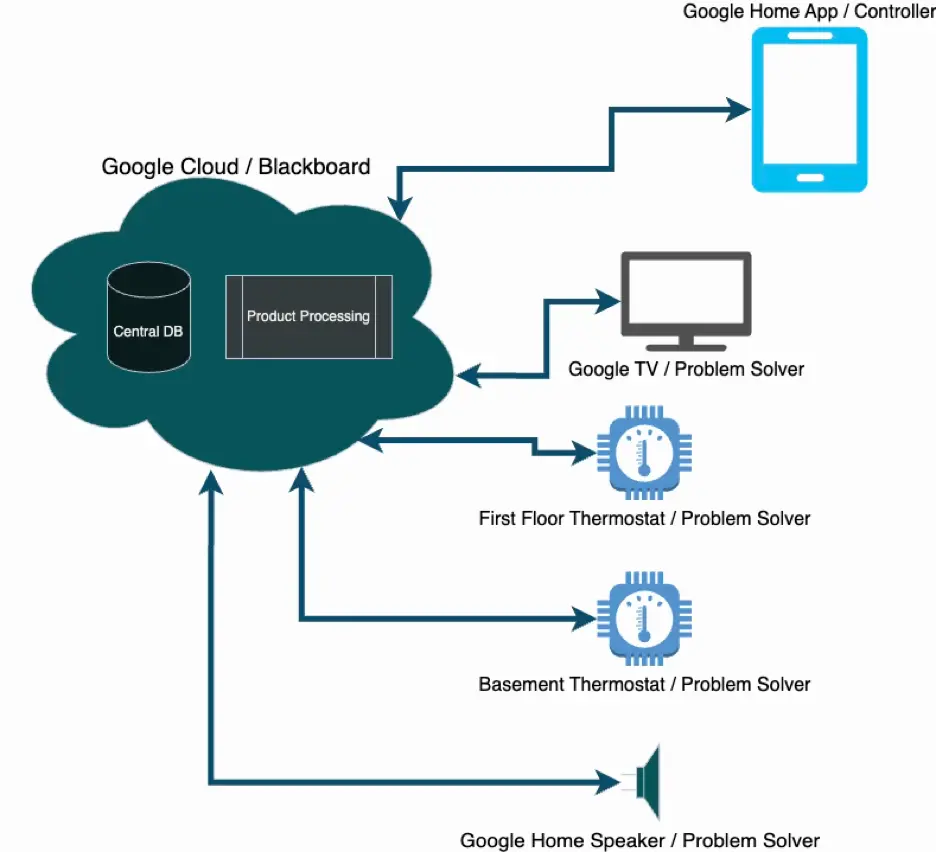
1. The Blackboard (Google Cloud)
This is the central data repository. It hosts the core functionality of the application and stores the current state of your entire home. Because the data lives in the cloud, you can control your heating even when you're away from home on a completely different network.
2. The Knowledge Sources (The Smart Devices)
These are the autonomous problem solvers or specialists.
- The Thermostats: Their job is to read the room temperature, send that data to the cloud, and turn the physical heat on or off when instructed.
- The Smart Speaker & TV: Their job is to listen for voice commands (like "Hey Google, turn up the basement den to 75") and translate those commands into data updates on the cloud.
3. The Controller (The Google Home App)
This is your user interface (Favorites, Devices, Automations, Activity, and Settings tabs). It’s the orchestrator. It connects the smart devices to your Wi-Fi initially, displays your daily energy usage charts, and lets you manually override the system when you want to turn things off.
Why Blackboard Architecture is Perfect for IoT
You might ask: Why not just have the smart speaker talk directly to the thermostat over your home Wi-Fi?
- Decoupling: If your smart speaker unplugged or crashed, your thermostat would still work perfectly. Because they are decoupled, one device failing doesn't break the entire system.
- Smart Problem Solving: Over time, Google Cloud gathers enough temperature and preference data from the blackboard to run an auto-scheduler. It literally "learns" your habits and solves the problem of keeping your house warm as economically as possible.
- Seamless Integration: It makes adding new devices incredibly easy. A new smart device doesn't need to know how to talk to every existing device in your house; it only needs to know how to read and write to the Google Cloud.